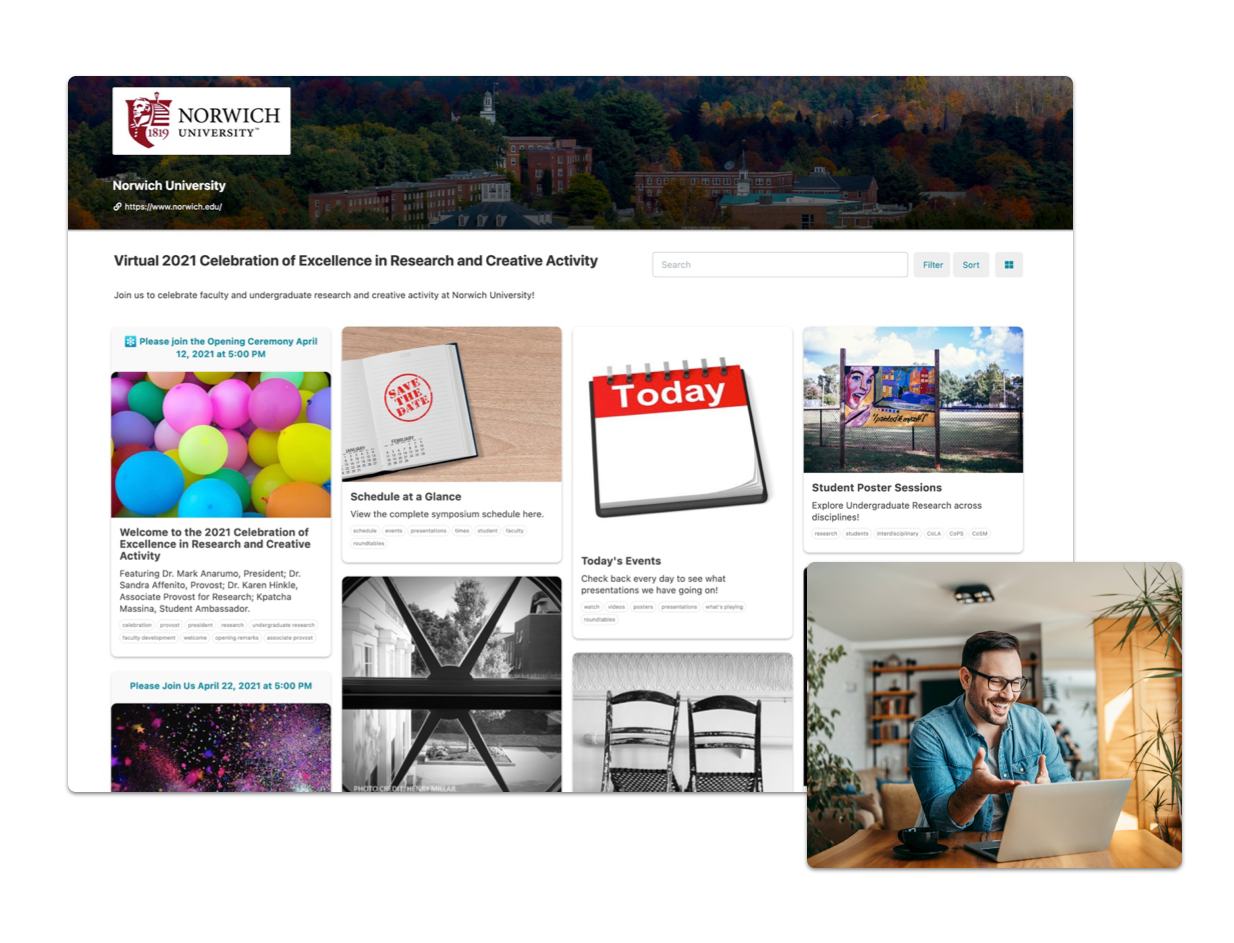
What is Acadiate?
The higher education experience platform built for stronger engagement
Acadiate gives institutions one branded place to deliver the experiences that matter most, from poster sessions and career fairs to talent zones, open houses, mentorship programs, and orientations. Schools can reach more people, increase participation, showcase talent, strengthen employer and alumni relationships, and make every experience more accessible online, in person, or hybrid. No app downloads required.
Trusted by Higher Education Teams





From idea to live in three simple steps
Build and launch a polished online experience in days, without complicated tools or app downloads.
-
1
Choose your experience
Start with the experience you want to run, such as a poster session, career fair, talent zone, open house, orientation, mentorship program, or something custom.
-
2
Build and invite
Use Acadiate’s simple builder to add your branding, content, schedule, participants, and audience details. Then invite students, faculty, employers, alumni, parents, or any group you want to engage.
-
3
Launch and measure
Run your experience live and on demand at the same time. Make updates while it is live, see how people are engaging, and use built in analytics to understand what is working.
Built for Higher Education
Start With the Experience You Need Most
You do not need every department involved to get started. Pick one experience, such as a poster session, career fair, talent zone, open house, or orientation, and build from there when you are ready.
For Students
These spaces develop growth mindsets, resilience, self-awareness, belonging, social-emotional learning, and more. Students can be creators, consumers, or both.
- Academic Research and Poster Sessions: Students publish poster pages, upload files, and present live to reviewers using video, chat, and comments.
- Club Hubs: Each club gets a profile page with events, announcements, membership info, and contact links in one place.
- Career Fairs: Employers host booths with role postings, students browse booths, and both sides connect through scheduled live sessions.
- Further Education Fairs: Programs list requirements, dates, and contacts so students can compare pathways and save options.
- Innovation Zones: Student teams post ideas, demos, and progress updates while collecting comments from peers and mentors.
- Mentorship: Students and mentors are matched, share resources, and track recurring meetings in one workspace.
- Mock Job Application: Students submit practice resumes and applications, then receive structured rubric-based feedback.
- Student Orientation: New students complete orientation modules, attend live sessions, and access key links and FAQs on demand.
- Case Competitions: Teams submit proposals, judges score against criteria, and rankings and feedback are published transparently.
- Wellness Experiences: Host workshops, office hours, and resource collections for stress management and mental health support.
- Show and Tell: Students share in-progress work and receive timestamped comments and peer review in a closed cohort space.
- Networking and Directory: Participants build profiles, search by interests, and message peers or alumni for introductions.
- Faculty Showcase and Office Hours: Faculty publish expertise pages and run recurring office-hour sessions with booking links.
- Bulletin Board: Post and filter opportunities like jobs, tutoring, rentals, and events with simple moderation controls.
- Belonging, Diversity, Equity, and Inclusion Spaces: Create dedicated spaces for affinity groups, targeted events, and community resources.
- Capstone Project Management, Review, and Showcasing: Teams track milestones, upload deliverables, and collect advisor and reviewer feedback.
- Alumni Mentorship Circles: Alumni lead topic-based cohort sessions with recurring schedules, notes, and follow-up resources.
- Peer Tutoring Exchange: Students post tutoring requests or availability, then book sessions and share materials.
- Student Project Marketplace: Teams publish project needs and recruit collaborators by role, skill, or interest.
- International Student Transition Hub: Centralize visa guidance, orientation checklists, local services, and peer support channels.
- Co-op and Internship Prep Studio: Run resume reviews, mock interviews, and employer-readiness checklists before recruitment cycles.
Live and On Demand
One experience, live and on demand
Acadiate experiences run in two modes at once: synchronous for real-time participation, and asynchronous for ongoing access. The effort you put into a live experience delivers value before it starts, between live moments, and after the live window ends. You can also schedule multiple live components within one experience, like a career fair with a recurring monthly live session, to create reliable momentum.
Synchronous Components
Power active participation during live experiences with built-in and embedded real-time interactions, including recurring live sessions that keep participants returning.
- Live sessions, panels, office hours, and recurring monthly sessions
- Real-time chat, Q&A, and community interaction
- Time-bound activities that create momentum
Asynchronous Components
Keep the same experience useful before, between, and after live sessions as a searchable information repository.
- Recordings, resources, and structured content pages
- Persistent links, documents, and media libraries
- Ongoing engagement between live moments
Online, In Person, and Hybrid
Meet students where they are
Acadiate is built for accessibility, not as an afterthought, but as a core principle. Run an experience fully online, use it to elevate an in-person event, or stitch the two together as a true hybrid. The goal is equitable access: every student, regardless of location, schedule, ability, or device, can fully participate in the experiences that matter to their journey.
Online Only
Run experiences entirely online so students can join from anywhere: commuter campuses, distance programs, study-abroad cohorts, and students balancing work or care responsibilities.
- No travel, no venue logistics, no app installs
- Mobile-ready for students on any device
- Built-in accessibility features for diverse learners
In Person, Elevated
Use Acadiate as a digital companion to in-person events. A single hub for posters, schedules, materials, and Q&A that lives on long after the room empties out.
- Replace printouts with rich, searchable pages
- Capture engagement and analytics on-site
- Keep the experience accessible after the event
True Hybrid
Combine in-person and online participation in a single experience so students who can’t make it in person are not second-class participants. They have the same content, voice, and visibility.
- One shared space for in-room and remote attendees
- Equitable access regardless of location or schedule
- Unified analytics across digital and in-person touchpoints
Time Capsule Effect
Experiences students can return to, even years later
Every Acadiate experience captures the moment: recordings, resources, posters, profiles, conversations, and outcomes. Students can revisit a career fair before a job interview, an alumna can return to the symposium that shaped her thinking, and faculty can point next year’s cohort to the work that came before. The experience does not end when the live window closes. It becomes part of the institution’s living archive of student engagement.
Why Acadiate
Why Teams Choose Acadiate
Easy to Use
No tech background required. Acadiate makes it easy for ANYONE to create amazing student experiences.
Make Live Updates Anytime
Dynamically update and change your student experience at any time, even during live experiences.
Reusable Templates
Run the same experience yearly, quarterly, or monthly? Save significant time by re-deploying past experiences fully or in part.
Supported
Get support from the Acadiate team as you build out your experience.
Flexible Experience Windows
All experiences come with a standard 90 day window with options to go longer or shorter.
Mobile Ready
Experiences are designed to automatically work on smart phones without downloading a 3rd party app.
Accessibility Built In
Designed to meet students where they are, with a platform engineered for equitable access across devices, abilities, and contexts.
Analytics
Get better insights on your experiences and student engagement whether online or in-person.
Secure
Using industry security and privacy best practices.
Beyond the LMS
Today’s students expect more than an LMS can deliver
Acadiate is purpose-built for the experiences your LMS was never designed to run, including career fairs, poster sessions, talent zones, open houses, mentorship programs, and more, with content, community, recordings, and live participation in one branded hub.
Typical LMS
- Built around courses, grades, and assignments
- Closed to enrolled students only
- Static pages and forum threads
- Minimal branding and customization
- Limited live and in-person integration
- Engagement metrics tied to coursework
Acadiate
- Built for experiences: fairs, showcases, hubs, and programs
- Easy external access for employers, alumni, parents, and prospects
- Media-rich, interactive pages with embeds for Zoom, Kahoot, Discord, and more
- Fully branded, visually polished, and customizable per audience
- Live and on-demand together, hybrid by default
- Engagement analytics across digital and in-person touchpoints
What Teams Say
Trusted by faculty and program leaders

“I found Acadiate much easier than other options we’ve tried for our recent remote events. The event itself went well and received several compliments from campus leaders for how ‘fun’ the site looked, how easy and flexible it was to navigate, and how smooth the live portions went.”
“I was tasked with putting on a two week symposium to cover a years’ worth of live events in a virtual format. I had no idea how to even start this project, but with the Acadiate platform I was transformed into what my team called a ‘wizard’. Acadiate made me look like I knew exactly what I was doing and the entire event went off without a hitch! They walked me through everything no matter how many times I asked and the support I received was paramount to the success I found. I would recommend Acadiate to anyone wanting to have a virtual event without reservation.”
Frequently Asked Questions
Common questions
How long does it take to launch an experience?
Most teams launch their first experience in days, not months. Reusable templates let you redeploy past experiences fully or in part, so a recurring fair, showcase, or open house only takes minutes to bring back. Our team helps map your first use case in a 30-minute call.
Do students need to download an app?
No. Acadiate experiences run in any modern browser on desktop and mobile. There is nothing to install for students, faculty, employers, parents, alumni, or special guests.
Can we update an experience while it is live?
Yes. You can change content, schedules, links, and resources at any time, including during a live session, and participants see the updates immediately.
How long does an experience stay live?
Standard experience windows are 90 days, with options to extend or shorten depending on your program. Recordings, resources, and content stay accessible asynchronously throughout the window.
Can people outside our institution participate?
Yes. Unlike a typical LMS, Acadiate makes it easy to include employers, alumni, prospective students, parents, industry partners, and special guests, with permissions you control.
What kind of support do we get?
The Acadiate team works with you as you design and launch your experiences. You also get access to templates, training materials, and live help from people who have run hundreds of higher-ed experiences.
Flexible and Affordable Solutions at Experience, Program, and Institution Levels.
See Acadiate in Action
In 30 minutes, we will map your use case and show exactly how your team can launch faster.